Sunday, April 23, 2017

Java Program for JSON RESTful Web Service Example

In this post, I intend to provide the sample code to prepare a Java RESTful web service to GET and POST JSON message. Jersey has been used to create the service.

Here is the Dynamic Web Project structure:
(Ignore the errors. Update Maven and those will be gone. The below code works fine.)
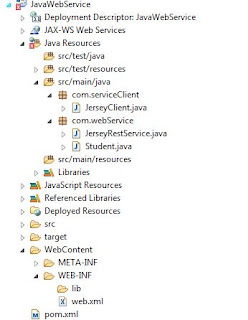


  • web.xml:


<?xml version="1.0" encoding="UTF-8"?>
<web-app xmlns:xsi="http://www.w3.org/2001/XMLSchema-instance" xmlns="http://java.sun.com/xml/ns/javaee" xsi:schemaLocation="http://java.sun.com/xml/ns/javaee http://java.sun.com/xml/ns/javaee/web-app_3_0.xsd" id="WebApp_ID" version="3.0">
  <display-name>Restful Web Application</display-name>
  <servlet>
    <servlet-name>jersey-XMLExample-serlvet</servlet-name>
    <servlet-class>
                     com.sun.jersey.spi.container.servlet.ServletContainer
                </servlet-class>
    <init-param>
      <param-name>com.sun.jersey.config.property.packages</param-name>
      <param-value>com</param-value>
    </init-param>
    <init-param>
      <param-name>com.sun.jersey.api.json.POJOMappingFeature</param-name>
      <param-value>true</param-value>
    </init-param>
    <load-on-startup>1</load-on-startup>
  </servlet>
  <servlet-mapping>
    <servlet-name>jersey-XMLExample-serlvet</servlet-name>
    <url-pattern>/rest/*</url-pattern>
  </servlet-mapping>
</web-app>


  • pom.xml:


<project xmlns="http://maven.apache.org/POM/4.0.0" xmlns:xsi="http://www.w3.org/2001/XMLSchema-instance"
xsi:schemaLocation="http://maven.apache.org/POM/4.0.0 http://maven.apache.org/xsd/maven-4.0.0.xsd">
<modelVersion>4.0.0</modelVersion>
<groupId>com.javacodegeeks.enterprise.rest.jersey</groupId>
<artifactId>JerseyJSONExample</artifactId>
<version>0.0.1-SNAPSHOT</version>

<repositories>
<repository>
<id>maven2-repository.java.net</id>
<name>Java.net Repository for Maven</name>
<url>http://download.java.net/maven/2/</url>
<layout>default</layout>
</repository>
</repositories>

<dependencies>

<dependency>
<groupId>com.sun.jersey</groupId>
<artifactId>jersey-server</artifactId>
<version>1.9</version>
</dependency>

<dependency>
<groupId>com.sun.jersey</groupId>
<artifactId>jersey-client</artifactId>
<version>1.9</version>
</dependency>

<dependency>
<groupId>com.sun.jersey</groupId>
<artifactId>jersey-json</artifactId>
<version>1.9</version>
</dependency>


</dependencies>

</project>


  • Student.java:


package com.webService;


public class Student {

private int id;
private String firstName;
private String lastName;
private int age;

// Must have no-argument constructor
public Student() {

}

public Student(String fname, String lname, int age, int id) {
this.firstName = fname;
this.lastName = lname;
this.age = age;
this.id = id;
}

public void setFirstName(String fname) {
this.firstName = fname;
}

public String getFirstName() {
return this.firstName;
}


public void setLastName(String lname) {
this.lastName = lname;
}

public String getLastName() {
return this.lastName;
}


public void setAge(int age) {
this.age = age;
}

public int getAge() {
return this.age;
}


public void setId(int id) {
this.id = id;
}

public int getId() {
return this.id;
}

@Override
public String toString() {
return new StringBuffer(" First Name : ").append(this.firstName)
.append(" Last Name : ").append(this.lastName)
.append(" Age : ").append(this.age).append(" ID : ")
.append(this.id).toString();
}

}


  • JerseyRestService.java:


package com.webService;

import javax.ws.rs.GET;
import javax.ws.rs.POST;
import javax.ws.rs.Path;
import javax.ws.rs.PathParam;
import javax.ws.rs.Produces;
import javax.ws.rs.Consumes;
import javax.ws.rs.core.MediaType;
import javax.ws.rs.core.Response;

@Path("/jsonServices")
public class JerseyRestService {


@GET
@Path("/show/{name}")
@Produces(MediaType.APPLICATION_JSON)
public Student produceJSON( @PathParam("name") String name ) {

Student st = new Student(name,"Mathews",36,1);

return st;

}

@POST
@Path("/sendMessage")
@Consumes(MediaType.APPLICATION_JSON)
public Response consumeJSON( Student student ) {

String output = student.toString();

return Response.status(200).entity(output).build();
}

}

  • JerseyClient.java:

package com.serviceClient;
import com.sun.jersey.api.client.Client;
import com.sun.jersey.api.client.ClientResponse;
import com.sun.jersey.api.client.WebResource;
import com.sun.jersey.api.client.config.ClientConfig;
import com.sun.jersey.api.client.config.DefaultClientConfig;
import com.sun.jersey.api.json.JSONConfiguration;
import com.webService.Student;
// http://localhost:8080/JavaWebService/rest/jsonServices/show/Pradeep -- GET
// http://localhost:8080/JavaWebService/rest/jsonServices/sendMessage -- POST
/*{
 "id": 1,
 "firstName": "MS",
 "lastName": "Dhoni",
 "age": 35
}*/
public class JerseyClient {

public static void main(String[] args) {
try {

Student st = new Student("Steve", "Smith", 28, 8);
ClientConfig clientConfig = new DefaultClientConfig();

clientConfig.getFeatures().put(
JSONConfiguration.FEATURE_POJO_MAPPING, Boolean.TRUE);

Client client = Client.create(clientConfig);

WebResource webResource = client
.resource("http://localhost:8080/JavaWebService/rest/jsonServices/sendMessage");

ClientResponse response = webResource.accept("application/json")
.type("application/json").post(ClientResponse.class, st);

if (response.getStatus() != 200) {
throw new RuntimeException("Failed : HTTP error code : "
+ response.getStatus());
}

String output = response.getEntity(String.class);

System.out.println("Server response! \n");
System.out.println(output);

} catch (Exception e) {

e.printStackTrace();

}

}

}


Run the Project on Server (e.g: Tomcat/Wildfly) and user the below URLs to see how it works:

  • GET:

http://localhost:8080/JavaWebService/rest/jsonServices/show/George


  • POST:

http://localhost:8080/JavaWebService/rest/jsonServices/sendMessage

Use the below JSON message to post from Postman or any other tool you prefer.

{
 "id": 1,
 "firstName": "MS",
 "lastName": "Dhoni",
 "age": 35
}

Thursday, April 30, 2015

Java Program to Implement Stack using Linked List

import java.util.*;
/*  Class Node  */
class Node
{
    protected int data;
    protected Node link;

    /*  Constructor  */
    public Node()
    {
        link = null;
        data = 0;
    }   
    /*  Constructor  */
    public Node(int d,Node n)
    {
        data = d;
        link = n;
    }   
    /*  Function to set link to next Node  */
    public void setLink(Node n)
    {
        link = n;
    }   
    /*  Function to set data to current Node  */
    public void setData(int d)
    {
        data = d;
    }   
    /*  Function to get link to next node  */
    public Node getLink()
    {
        return link;
    }   
    /*  Function to get data from current Node  */
    public int getData()
    {
        return data;
    }
}
/*  Class linkedStack  */
class linkedStack
{
    protected Node top ;
    protected int size ;

    /*  Constructor  */
    public linkedStack()
    {
        top = null;
        size = 0;
    }   
    /*  Function to check if stack is empty */
    public boolean isEmpty()
    {
        return top == null;
    }   
    /*  Function to get the size of the stack */
    public int getSize()
    {
        return size;
    }   
    /*  Function to push an element to the stack */
    public void push(int data)
    {
        Node nptr = new Node (data, null);
        if (top == null)
            top = nptr;
        else
        {
            nptr.setLink(top);
            top = nptr;
        }
        size++ ;
    }   
    /*  Function to pop an element from the stack */
    public int pop()
    {
        if (isEmpty() )
            throw new NoSuchElementException("Underflow Exception") ;
        Node ptr = top;
        top = ptr.getLink();
        size-- ;
        return ptr.getData();
    }   
    /*  Function to check the top element of the stack */
    public int peek()
    {
        if (isEmpty() )
            throw new NoSuchElementException("Underflow Exception") ;
        return top.getData();
    }   
    /*  Function to display the status of the stack */
    public void display()
    {
        System.out.print("\nStack = ");
        if (size == 0)
        {
            System.out.print("Empty\n");
            return ;
        }
        Node ptr = top;
        while (ptr != null)
        {
            System.out.print(ptr.getData()+" ");
            ptr = ptr.getLink();
        }
        System.out.println();       
    }
}

/* Class LinkedStackImplement */
public class LinkedStackImplement
{   
    public static void main(String[] args)
    {
        Scanner scan = new Scanner(System.in);  
        /* Creating object of class linkedStack */  
        linkedStack ls = new linkedStack();         
        /* Perform Stack Operations */ 
        System.out.println("Linked Stack Test\n"); 
        char ch;    
        do
        {
            System.out.println("\nLinked Stack Operations");
            System.out.println("1. push");
            System.out.println("2. pop");
            System.out.println("3. peek");
            System.out.println("4. check empty");
            System.out.println("5. size");           
            int choice = scan.nextInt();
            switch (choice)
            {
            case 1 :
                System.out.println("Enter integer element to push");
                ls.push( scan.nextInt() );
                break;                        
            case 2 :
                try
                {
                    System.out.println("Popped Element = "+ ls.pop());
                }
                catch (Exception e)
                {
                    System.out.println("Error : " + e.getMessage());
                }   
                break;                        
            case 3 :
                try
                {
                    System.out.println("Peek Element = "+ ls.peek());
                }
                catch (Exception e)
                {
                    System.out.println("Error : " + e.getMessage());
                }
                break;                        
            case 4 :
                System.out.println("Empty status = "+ ls.isEmpty());
                break;               
            case 5 :
                System.out.println("Size = "+ ls.getSize());
                break;               
            case 6 :
                System.out.println("Stack = ");
                ls.display();
                break;                       
            default :
                System.out.println("Wrong Entry \n ");
                break;
            }          
            /* display stack */   
            ls.display();           
            System.out.println("\nDo you want to continue (Type y or n) \n");
            ch = scan.next().charAt(0);      

        } while (ch == 'Y'|| ch == 'y');                
    }
}

Thursday, October 30, 2014

Java Program to demonstrate Exception Handling using try-catch block


public class MyExceptionHandle {
    public static void main(String a[]){
        try{
            for(int i=5;i>=0;i--){
                System.out.println(10/i);
            }
        } catch(Exception ex){
            System.out.println("Exception Message: "+ex.getMessage());
            ex.printStackTrace();
        }
        System.out.println("After for loop...");
    }
}


Output:

2
2
3
5
10
Exception Message: / by zero
java.lang.ArithmeticException: / by zero
        at com.myjava.exceptions.MyExceptionHandle.main(MyExceptionHandle.java:12)
After for loop...

Java Program to read integers from file with Scanner class


import java.util.Scanner;
import java.io.File;
import java.io.IOException;

public class ReadIntegers
{
    public static void main(String[] args)
    { try
{   Scanner s = new Scanner( new File("integers.dat") );
   while( s.hasNextInt() )
   { System.out.println( s.nextInt() );
   }
}
catch(IOException e)
{ System.out.println( e );
}
    }
}

Java Program to write 100 random integers to a file, 1 per line


import java.io.PrintStream;
import java.io.IOException;
import java.io.File;

import java.util.Random;

public class IntegersToFile
{ public static void main(String[] args)
{ try
{ PrintStream writer = new PrintStream( new File("randInts.txt"));
Random r = new Random();
final int LIMIT = 100;

for(int i = 0; i < LIMIT; i++)
{ writer.println( r.nextInt() );
}
writer.close();
}
catch(IOException e)
{ System.out.println("An error occured while trying to write to the file");
}
}
}

Java program to take input from Keyboard with Scanner class


import java.util.Scanner;

public class KeyboardInput
{

public static void main(String[] args)
{ Scanner s = new Scanner(System.in);
System.out.print( "Enter your name: "  );
String name = s.nextLine();
System.out.println( "Hello " + name + "!" );
}
}

Sunday, October 26, 2014

Java Program to demonstrate Set


SetExample.java:

import java.util.*;

public class SetExample {

   public static void main(String args[]) {

       // We create a new, empty set
       Set mySet1 = new HashSet();
       // We add a few elements
       mySet1.add("A");
       mySet1.add("C");
       mySet1.add("A");
       mySet1.add("B");
       // Print the elements of the Set
       System.out.println("mySet1: " + mySet1);

       // Create a list and add some elements
       List list = new ArrayList();
       list.add("A");
       list.add("C");
       list.add("A");
       list.add("A");
       list.add("B");
       list.add("C");
       // Now create the set using the appropriate constructor
       Set mySet2 = new HashSet(list);
       // Print the elements of the list an the the set
       System.out.println("list: " + list);
       System.out.println("mySet2: " + mySet2);

       // Compare the two sets
       System.out.println("MySet1 matches mySet2: " + mySet1.equals(mySet2));

       // Now we will remove one element from mySet2 and compare again
       mySet2.remove("A");
       System.out.println("mySet2: " + mySet2);
       System.out.println("MySet1 matches mySet2: " + mySet1.equals(mySet2));

       // Lets check if our sets contain all the elements of the list
       System.out.println("MySet1 contains all the elements: " + mySet1.containsAll(list));
       System.out.println("MySet2 contains all the elements: " + mySet2.containsAll(list));

       // Use of Iterator in Set
       Iterator iterator = mySet1.iterator();
       while (iterator.hasNext()) {
           System.out.println("Iterator loop: " + iterator.next());
       }

       // Use of for-each in Set
       for (String str : mySet1) {
           System.out.println("for-each loop: " + str);
       }

       // Clearing all the elements
       mySet1.clear();
       System.out.println("mySet1 is Empty: " + mySet1.isEmpty());

       // Checking the number of elements
       System.out.println("mySet1 has: " + mySet1.size() + " Elements");
       System.out.println("mySet2 has: " + mySet2.size() + " Elements");

       // Creating an Array with the contents of the set
       String[] array = mySet2.toArray(new String[mySet2.size()]);
       System.out.println("The array:" + Arrays.toString(array));
   }
}
Output:
mySet1: [A, B, C]
list: [A, C, A, A, B, C]
mySet2: [A, B, C]
MySet1 matches mySet2: true
mySet2: [B, C]
MySet1 matches mySet2: false
MySet1 contains all the elements: true
MySet2 contains all the elements: false
Iterator loop: A
Iterator loop: B
Iterator loop: C
for-each loop: A
for-each loop: B
for-each loop: C
mySet1 is Empty: true
mySet1 has: 0 Elements
mySet2 has: 2 Elements
The array:[B, C]

Java Program to demonstrate ConcurrentHashMap


ConcurrentHashMapExample.java:
import java.util.Enumeration;
import java.util.concurrent.ConcurrentHashMap;

public class ConcurrentHashMapExample {
   
   public static void main(String[] args) {
       ConcurrentHashMap vehicles = new ConcurrentHashMap();
       
       // Add some vehicles.
       vehicles.put("BMW", 5);
       vehicles.put("Mercedes", 3);
       vehicles.put("Audi", 4);
       vehicles.put("Ford", 10);
       
       System.out.println("Total vehicles: " + vehicles.size());
       
       // Iterate over all vehicles, using the keySet method.
       for(String key: vehicles.keySet())
           System.out.println(key + " - " + vehicles.get(key));
       System.out.println();
       
       String searchKey = "Audi";
       if(vehicles.containsKey(searchKey))
           System.out.println("Found total " + vehicles.get(searchKey) + " "
                   + searchKey + " cars!\n");
       
       Enumeration elems = vehicles.elements();
       while(elems.hasMoreElements())
           System.out.println(elems.nextElement());
       System.out.println();
       
       Integer val = vehicles.putIfAbsent("Audi", 9);
       if(val != null)
           System.out.println("Audi was found in the map and its value was updated!");
       
       val = vehicles.putIfAbsent("Nissan", 9);
       if(val == null)
           System.out.println("Nissan wasn't found in map, thus a new pair was created!");
       System.out.println();
       
       // The next statements throw a NullPointerException, if uncommented.
       //vehicles.put("Nissan", null);
       //vehicles.put(null, 6);
       
       // Clear all values.
       vehicles.clear();
       
       // Equals to zero.
       System.out.println("After clear operation, size: " + vehicles.size());
   }
}
A sample execution is shown below:
Total vehicles: 4
BMW - 5
Mercedes - 3
Audi - 4
Ford - 10
Found total 4 Audi cars!
5
3
4
10
Audi was found in the map and its value was updated!
Nissan wasn't found in map, thus a new pair was created!
After clear operation, size: 0

Java Program to demonstrate TreeMap


TreeMapExample.java:
import java.util.TreeMap;

public class TreeMapExample {

   public static void main(String[] args) {
       TreeMap vehicles = new TreeMap();
       
       // Add some vehicles.
       vehicles.put("BMW", 5);
       vehicles.put("Mercedes", 3);
       vehicles.put("Audi", 4);
       vehicles.put("Ford", 10);
       
       System.out.println("Total vehicles: " + vehicles.size());
       
       // Iterate over all vehicles, using the keySet method.
       for(String key: vehicles.keySet())
           System.out.println(key + " - " + vehicles.get(key));
       System.out.println();
       
       System.out.println("Highest key: " + vehicles.lastKey());
       System.out.println("Lowest key: " + vehicles.firstKey());
       
       System.out.println("\nPrinting all values:");
       for(Integer val: vehicles.values())
           System.out.println(val);
       System.out.println();
       
       // Clear all values.
       vehicles.clear();
       
       // Equals to zero.
       System.out.println("After clear operation, size: " + vehicles.size());
   }
}
A sample execution is shown below:
Total vehicles: 4
Audi - 4
BMW - 5
Ford - 10
Mercedes - 3

Highest key: Mercedes
Lowest key: Audi

Printing all values:
4
5
10
3

After clear operation, size: 0

Java Program to demonstrate HashTable


HashTableExample.java:
import java.util.Hashtable;
import java.util.Map;
 
public class HashTableExample {
 
   public static void main(String[] args) {
       Map vehicles = new Hashtable();
        
       // Add some vehicles.
       vehicles.put("BMW", 5);
       vehicles.put("Mercedes", 3);
       vehicles.put("Audi", 4);
       vehicles.put("Ford", 10);
        
       System.out.println("Total vehicles: " + vehicles.size());
        
       // Iterate over all vehicles, using the keySet method.
       for(String key: vehicles.keySet())
           System.out.println(key + " - " + vehicles.get(key));
       System.out.println();
        
       String searchKey = "Audi";
       if(vehicles.containsKey(searchKey))
           System.out.println("Found total " + vehicles.get(searchKey) + " "
                   + searchKey + " cars!\n");
        
       // Clear all values.
       vehicles.clear();
        
       // Equals to zero.
       System.out.println("After clear operation, size: " + vehicles.size());
 
       // The next statements throw a NullPointerException, if uncommented.
       //vehicles.put("Nissan", null);
       //vehicles.put(null, 6);
   }
}
A sample execution is shown below:
Total vehicles: 4
Audi - 4
Ford - 10
BMW - 5
Mercedes - 3
Found total 4 Audi cars!
After clear operation, size: 0

Java Program to demonstrate HashMap


HashMapExample.java:
import java.util.HashMap;
import java.util.Map;
 
public class HashMapExample {
    
   public static void main(String[] args) {
       Map vehicles = new HashMap();
        
       // Add some vehicles.
       vehicles.put("BMW", 5);
       vehicles.put("Mercedes", 3);
       vehicles.put("Audi", 4);
       vehicles.put("Ford", 10);
        
       System.out.println("Total vehicles: " + vehicles.size());
        
       // Iterate over all vehicles, using the keySet method.
       for(String key: vehicles.keySet())
           System.out.println(key + " - " + vehicles.get(key));
       System.out.println();
        
       String searchKey = "Audi";
       if(vehicles.containsKey(searchKey))
           System.out.println("Found total " + vehicles.get(searchKey) + " "
                   + searchKey + " cars!\n");
        
       // Clear all values.
       vehicles.clear();
        
       // Equals to zero.
       System.out.println("After clear operation, size: " + vehicles.size()); 
   }
}
A sample execution is shown below:
Total vehicles: 4
Audi - 4
Ford - 10
BMW - 5
Mercedes - 3
Found total 4 Audi cars!
After clear operation, size: 0

Java program to print the sum of array of elements


class SingleArray
{
    public static void main (String args[])
    {
  
        int number_array [] = {10,30,50,70,90,110};
        int result = 0;
        for (int ctr = 0; ctr < 6; ctr++)
               result = result + number_array [ctr];
System.out.println ("Sum of the array elements is : " +result);
}
}

Saturday, December 7, 2013

Java Program to check whether the words in a string are in ascending order or not.

import java.io.BufferedReader;
import java.io.IOException;
import java.io.InputStreamReader;

public class AscendingOrder {
    public static void main(String[] args) throws IOException {
        BufferedReader reader = new BufferedReader(new InputStreamReader(
                System.in));
        System.out.println(" Enter the String ");
        Boolean flag = true;
        String str = reader.readLine();
        for (int index = 0; index <= str.length() - 2; index++) {
            int check = (int) str.charAt(index) - (int) str.charAt(index + 1);
            if (check > 0)
                flag = false;

        }
        if (flag) {
            System.out.println(" Ascending Order");

        } else {
            System.out.println(" Not in Ascending Order");

        }

    }

}

Java Program to find the occurences of a digit in a number

import java.io.BufferedReader;
import java.io.IOException;
import java.io.InputStreamReader;

public class Occurences {

    public static void main(String[] args) throws IOException {
        BufferedReader reader = new BufferedReader(new InputStreamReader(
                System.in));
        System.out.println(" Enter the number ");
        int first = Integer.parseInt(reader.readLine());
        System.out.println(" Enter the digit to be searched ");
        int second = Integer.parseInt(reader.readLine());
        int count = 0, m;
        while (first > 0) {
            m = first % 10;
            if (m == second)
                count++;
            first = first / 10;
        }

        System.out.println("Number Of Occurences " + count);
    }
}

Java Program to find the number of occurences of a word in a string

import java.io.BufferedReader;
import java.io.IOException;
import java.io.InputStreamReader;

public class WordOccurence {

    /**
     * @param args
     */
    public static void main(String[] args) throws IOException {
        BufferedReader reader = new BufferedReader(new InputStreamReader(
                System.in));
        System.out.println(" Enter the  String ");
        String first = reader.readLine();
        System.out.println(" Enter the Word to be searched");
        String second = reader.readLine();
        int count = 0;

        String[] array = first.split(" ");
        for (int i = 0; i < array.length; i++) {
            if (array[i].equals(second))
                ++count;

        }

        System.out.println(" No. Of Occurences  " + count);
    }
}

Java Program to find nth term in a TRIBONACCI series

 // 0,1,1,2,4,7,13,.....


import java.io.BufferedReader;
import java.io.IOException;
import java.io.InputStreamReader;

public class Tribonacci {

    /**
     * @param args
     */
    public static void main(String[] args) throws IOException {
        // TODO Auto-generated method stub
        BufferedReader reader = new BufferedReader(new InputStreamReader(
                System.in));
        System.out.println(" Enter the number ");
        int num = Integer.parseInt(reader.readLine());
        int first = 0, second = 1, third = 1, nthTerm = 0;
        int num1 = num;
        if (num == 1)
            nthTerm = 0;

        if (num == 2 || num == 3)
            nthTerm = 1;

        while (num > 3) {
            nthTerm = first + second + third;
            // System.out.print(d +"\t");
            num--;
            first = second;
            second = third;
            third = nthTerm;
        }
        System.out.print(num1 + "th term of the Tribonacci is " + nthTerm);
    }
}

Java Program to seach a substring in a string

import java.io.*;

public class SearchKeyWord {

    public static void main(String[] args) throws IOException {

        BufferedReader reader = new BufferedReader(new InputStreamReader(System.in));

        System.out.print("\nPlease enter product Name  :");

        int count = 0;

        boolean flag = false;

        String productName = reader.readLine();

        System.out.print("\nPlease enter Key word:");

        String keyword = reader.readLine();

        for (int index1 = 0; index1 < productName.length(); index1++) {

            for (int index2 = 0, index3 = index1; index2 < keyword.length(); index2++, index3++) {

                if (index3 < productName.length()) {

                    if (productName.charAt(index3) == keyword.charAt(index2)) {

                        flag = true;

                        count++;

                    }

                }

            }

            if (count == keyword.length()) {

                flag = true;

                break;

            }

            else {

                flag = false;

            }

            count = 0;

        }

        if (flag == true) {

            System.out.print("Yes, the key word is present in the product");

        }

        else {

            System.out.print("No, The key word is NOT present in the product");

        }

    }

}

Java Program to count prime numbers below a given number.

import java.io.BufferedReader;
import java.io.IOException;
import java.io.InputStreamReader;

public class PrimeNumbers {

    /**
     * @param args
     */
    public static void main(String[] args) throws IOException {
        // TODO Auto-generated method stub
        BufferedReader reader = new BufferedReader(new InputStreamReader(
                System.in));
        System.out.println(" Enter the limit for the prime number ");
        int limit = Integer.parseInt(reader.readLine());
        int count = 0,total_count=0;
       
        for (int index1 = 1; index1 < limit; index1++) {
            for (int index2 = 1; index2 <= index1; index2++) {
                if (index1 % index2 == 0) {
                    count++;
                }
            }
            if (count == 2) {
                System.out.print(index1 + "\t");
                total_count++;

            }
            count = 0;
        }

        System.out.println();
        System.out.println(" Total Number of prime numbers = "+total_count);
    }

}